Microsoft Clarity Is Recording Your Sessions, Then Quietly Throwing Them Away
This is a story about a tool that appears to work perfectly fine, right up until it doesn’t. And then, frustratingly, it works again, but only after you discover a rule nobody told you existed.
If you’ve ever opened Microsoft Clarity, watched users move around your site in Live View, felt reasonably confident that tracking is set up correctly, and then later realised that none of those sessions were actually saved…
You didn’t misconfigure anything, and judging by the number of identical questions scattered across forums, you’re not alone.
What you ran into isn’t a bug in the usual sense. It’s a mismatch between how Clarity thinks about cookies and consent, and how most humans reasonably expect those things to work.
If you’re just looking for a quick fix, scroll to the bottom of this article.
The pattern that keeps repeating
When you go looking for answers, you quickly fall into the same rabbit hole everyone else does:
- “Microsoft Clarity live sessions disappear”
- “Clarity shows live users but no recordings”
- “Only one session per page load in Clarity”
- “Clarity cookie issue”
- “Clarity GDPR consent problem”
And the symptoms are remarkably consistent:
- Clarity is installed
- Live sessions show up correctly
- Users click around
- The session ends
- The recording is gone
- No warnings
- No errors
- Just an empty session list
This is where people start doubting themselves, because the UI is actively telling you that Clarity can see users. You watched it happen. You didn’t hallucinate the mouse movements.
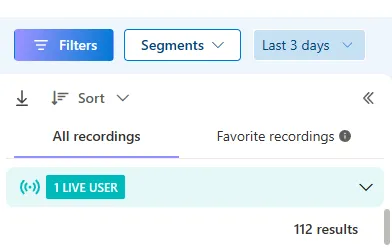
But the data never makes it to storage.
Where expectations quietly diverge
To understand why this is so confusing, you have to look at the assumptions most of us bring into the setup.
Clarity documentation mentions cookies as a feature that can help with session stitching. If you run into issues like getting only one session per page load, you’re told to enable the cookie feature, so Clarity can stitch page views into a single session. Side bonus, it can track single user sessions across time.
So, you do that.
At that point, a very reasonable mental model forms:
- Cookies are needed for session continuity
- CMPs exist to make cookies legally acceptable
- If cookies work and consent exists, analytics should work
From a human perspective, that’s coherent. Logical, even.
But that’s not Clarity’s mental model.
Cookies are not consent (at least not to Clarity)
Here’s the non-intuitive part that almost nobody explains clearly.
Clarity treats cookies and consent as two separate concerns:
- Cookies are a technical mechanism for session stitching
- Consent is a legal signal that determines whether data may be persisted
You can have cookies fully enabled, sessions perfectly stitched, Live View working flawlessly, and still have Clarity discard everything at the end.
Why?
Because Clarity does not infer consent from the existence of cookies.
It doesn’t reliably read CMP cookies. It doesn’t assume that “cookies are on” equals “analytics storage is allowed.” And it doesn’t warn you when that assumption fails.
Instead, after the live session ends, Clarity performs a second check that isn’t visible anywhere in the UI. If it doesn’t have a record of explicit consent, it discards the recording. Amazingly, it doesn’t perform this check before allowing you to see the live session.
“But the user already accepted cookies”
Yes. And this is exactly where people get stuck.
Your CMP did its job:
- It showed the banner
- It stored the consent
- It remembered the choice
- It didn’t annoy the user again
From a compliance standpoint, everything is fine.
From Clarity’s standpoint, nothing happened.
Unless consent is actively signaled to Clarity in the way it expects, consent might as well not exist. The fact that it lives in a cookie somewhere else in the stack is irrelevant.
Why “native integrations” can be a problem
Both CMPs and Clarity like to say they have native integrations with Google Tag Manager and with each other. That sounds reassuring, but it hides an important limitation.
In practice, “native integration” usually means:
We won’t interfere with each other’s execution.
It does not mean:
We will reliably synchronize consent state, timing, and lifecycle across tools.
As long as everything lives inside GTM and fires in the “right” order, things might even work. This is why some very basic, non-GDPR-constrained setups seem fine, especially when people are just testing Clarity out of the box.
But the moment you do anything beyond the most basic setup, the illusion breaks.
Where things often break in real projects
In my case, the problem surfaced when I was doing something entirely reasonable: implementing custom ID tagging.
To do that cleanly, I moved Clarity out of GTM so I could:
- Load it directly
- Control initialization more precisely
- Pass a custom
visitorID
From my perspective, nothing fundamental changed. Consent already existed. Cookies already worked. Clarity had been recording live sessions before.
From Clarity’s perspective, everything changed.
The consent signal it had been implicitly receiving via GTM never arrived. Live View still worked, because Clarity optimistically records first and asks legal questions later. But once the session ended, persistence was denied.
Not because GDPR was violated, but because Clarity never received the memo.
Why SPAs make this worse
Single Page Applications amplify this problem.
In React, Vue, and similar setups:
- Pages don’t reload
- Consent banners run once
- Analytics sessions span multiple routes
- Timing becomes critical
If consent is granted once but never re-announced in a way Clarity understands, you end up with the worst possible failure mode:
- Everything looks fine in Live View
- Nothing is stored afterward
Which explains why so many of the complaints you’ll find come from modern frontend stacks.
“No-code” doesn’t mean “no wiring”
This is the part vendors don’t like to highlight.
Modern analytics stacks are compliant by isolation, not by coordination. Every tool protects itself legally, assumes nothing, and requires explicit signals to proceed.
So yes:
- The CMP is “no-code”
- Clarity is “no-code”
- GTM is “no-code”
But the connections between them absolutely are not.
Someone still has to design the handshake.
The fix, at a conceptual level
You don’t need to dive deep into JavaScript to understand what actually needs to happen.
Clarity must receive an explicit signal that says, in no uncertain terms:
Analytics storage is allowed.
And that signal needs to be sent:
- When the user accepts cookies
- On subsequent visits, even if the banner doesn’t reappear
- Early enough that Clarity trusts the session lifecycle
That signal does not automatically travel from your CMP to Clarity unless you wire it yourself. Once you do, the disappearing sessions stop.
Why this keeps burning people
The reason so many people hit this issue isn’t incompetence. It’s that the system behaves in a way that violates reasonable expectations. First, the fact that consent is a major condition for Clarity to work is not immediately obvious or well documented.
Second, the system fails in a way that is invisible and counterintuitive. There is no logical reason to think that:
- Cookies being enabled
- Sessions being stitched
- Live recordings working
…would still result in recordings being discarded after the fact.
There’s also no visible feedback loop telling you that consent was missing.
The important lesson beyond this specific case
The lesson here is that when using no-code solutions, be careful about tools with lacking documentation and templated GTM tags. If you get into a position where stitching together is needed, you’ll have to guess more than follow logical steps
And when the issue has an illogical reason, it’s easy to get stuck.
The fix for anyone here using Clarity and struggling with this issue
Below is my GTM (custom HTML) tag that makes sure Clarity gets the consent signal from my cookie management platform. Depending on what you’re using to manage cookie consent, edit the parts as described in the comments.
Important: The code is triggered on page initialization and not on “All pages” DOM ready, so that it’s always ready before Clarity loads
<script>
/*
  PURPOSE (in plain English)
  --------------------------
  Microsoft Clarity can show Live View even when it later refuses to *store* recordings.
  One common reason: Clarity never receives an explicit "consent" signal.

  This snippet does ONE job:
  - Whenever your Consent Management Platform (CMP) knows the user's consent status,
    we translate that into the format Clarity expects and send it to Clarity.

  CookieHub is used here as the CMP example.
  If you use a different CMP, you keep the Clarity part and replace:
  - how you *read* consent
  - which events you listen to
*/

/* Wrap everything to avoid leaking variables into the global scope */
(function () {

  // ---------------------------------------------------------------------------
  // 1) Create a Clarity "stub" function (queue) so calls are safe even if
  //    Clarity hasn't loaded yet.
  //
  // Why this matters:
  // - Your page might run this script BEFORE the real Clarity script finishes loading.
  // - If you call `clarity(...)` too early and it doesn't exist, you'll crash the page.
  // - This pattern stores calls in `window.clarity.q` until Clarity is ready.
  // ---------------------------------------------------------------------------
  window.clarity = window.clarity || function () {
    (window.clarity.q = window.clarity.q || []).push(arguments);
  };

  // ---------------------------------------------------------------------------
  // 2) A single function that:
  //    - checks the CMP for consent
  //    - maps that consent into Clarity's consent format
  //    - sends it via `clarity("consentv2", ...)`
  //
  // IMPORTANT:
  // - "cookies enabled" is NOT the same as "consent signaled to Clarity".
  // - This function is the "handshake".
  // ---------------------------------------------------------------------------
  function pushConsentToClarity() {

    // -----------------------------
    // CMP DETECTION (CookieHub)
    // -----------------------------
    // CookieHub exposes a global object: window.cookiehub
    // If it's not there yet, we cannot read consent.
    //
    // Generalizing this:
    // - For OneTrust you might check window.OneTrust / OneTrustActiveGroups, etc.
    // - For Cookiebot you might check window.Cookiebot, etc.
    if (!window.cookiehub) return;

    // -----------------------------
    // READ CONSENT FROM CMP
    // -----------------------------
    // CookieHub uses categories like "analytics" and "marketing".
    // This is CMP-specific — other tools name categories differently.
    //
    // Generalizing this:
    // - Replace these lines with whatever your CMP provides
    //   (e.g., “statistics”, “advertising”, “performance”, group IDs, etc.)
    var analyticsGranted = window.cookiehub.hasConsented("analytics") === true;
    var marketingGranted = window.cookiehub.hasConsented("marketing") === true;

    // -----------------------------
    // MAP CMP CONSENT -> CLARITY CONSENT
    // -----------------------------
    // Clarity expects these keys (note the casing):
    // - analytics_Storage
    // - ad_Storage
    //
    // It expects values "granted" or "denied".
    //
    // Why two keys?
    // - "analytics_Storage" covers analytics/session recording storage.
    // - "ad_Storage" is for advertising-related storage.
    //
    // If your cookie categories don't match 1:1, that's okay.
    // Your job is to decide which CMP category should control which Clarity flag.
    window.clarity("consentv2", {
      ad_Storage: marketingGranted ? "granted" : "denied",
      analytics_Storage: analyticsGranted ? "granted" : "denied"
    });

    // Helpful for debugging:
    // If sessions still disappear, open the browser console and confirm
    // this log appears AND shows granted when you expect it to.
    console.log("[Clarity] consentv2 sent", {
      analyticsGranted: analyticsGranted,
      marketingGranted: marketingGranted
    });
  }

  // ---------------------------------------------------------------------------
  // 3) Listen for CMP lifecycle events.
  //
  // Why this matters:
  // - Consent isn't just "read once".
  // - You need to send consent:
  //   a) when the CMP initializes (first determines consent)
  //   b) whenever the user changes their choice (accept/reject/update)
  //
  // CookieHub emits:
  // - "cookiehub_onInitialise"
  // - "cookiehub_onStatusChange"
  //
  // Generalizing this:
  // - Replace these event names with your CMP's equivalents.
  // ---------------------------------------------------------------------------
  document.addEventListener("cookiehub_onInitialise", pushConsentToClarity);
  document.addEventListener("cookiehub_onStatusChange", pushConsentToClarity);

  // ---------------------------------------------------------------------------
  // 4) Timing fallback (because the web is a race condition wearing makeup).
  //
  // Problem:
  // - Sometimes your script runs before the CMP has loaded and created `window.cookiehub`.
  // - In that case, the event might fire before you're listening, or you might miss
  //   the initial consent state.
  //
  // Solution:
  // - Try periodically for a short time:
  //   - if CMP appears, push consent once and stop
  //   - if CMP never appears, stop trying
  //
  // This is not elegant, but it is practical.
  // ---------------------------------------------------------------------------
  var tries = 0;
  var t = setInterval(function () {
    tries++;

    // If CMP is now available, push consent and stop retrying.
    if (window.cookiehub) {
      pushConsentToClarity();
      clearInterval(t);
    }

    // Safety stop: 50 tries * 100ms = 5 seconds max.
    // We don't want to poll forever.
    if (tries > 50) clearInterval(t);
  }, 100);

})();
</script>